App Guides & Comparisons
Meal Planner + Grocery List Workflow (Step-by-Step)
This workflow shows how to go from meal plan to grocery checkout with less friction.
The Ultimate Meal Planner & Grocery List Workflow (Step-by-Step)
For most families, the friction of feeding everyone doesn't just happen at the dinner table—it happens during the planning phase. You sit down with cookbooks, try to remember who hates what, write out a grocery list, and inevitably end up buying three jars of cumin because you didn't check the pantry.
If you are tired of spending your Sunday afternoons cross-referencing recipes and rewriting messy shopping lists, you need a system that does the heavy lifting for you.
Here is a step-by-step workflow for turning your family's complex tastes into a clean, automated weekly menu and a frictionless grocery store trip, using the PlatterPop AI family meal planner.

Step 1: The Onboarding (Building Your Family Profile)
The secret to a meal plan that actually works is setting the right constraints from the very beginning. Traditional apps ask you to pick from a massive list of recipes. PlatterPop works differently: it wants to know exactly who it is cooking for.
During the onboarding process, the app will ask you a series of questions to build a comprehensive Flavor Profile for your household. You will input:
- Favorite dishes, cuisines, and must-have ingredients.
- Disliked ingredients (so you never see them again).
- Allergies, dietary restrictions, and diet macros.
The "One Meal Fits All" Rule: Here is the best part for busy parents. PlatterPop takes all of these conflicting restrictions and uses them to generate one single dish per meal that everyone in the family can eat. No more acting like a short-order cook making three different dinners.
Step 2: Setting the Ground Rules
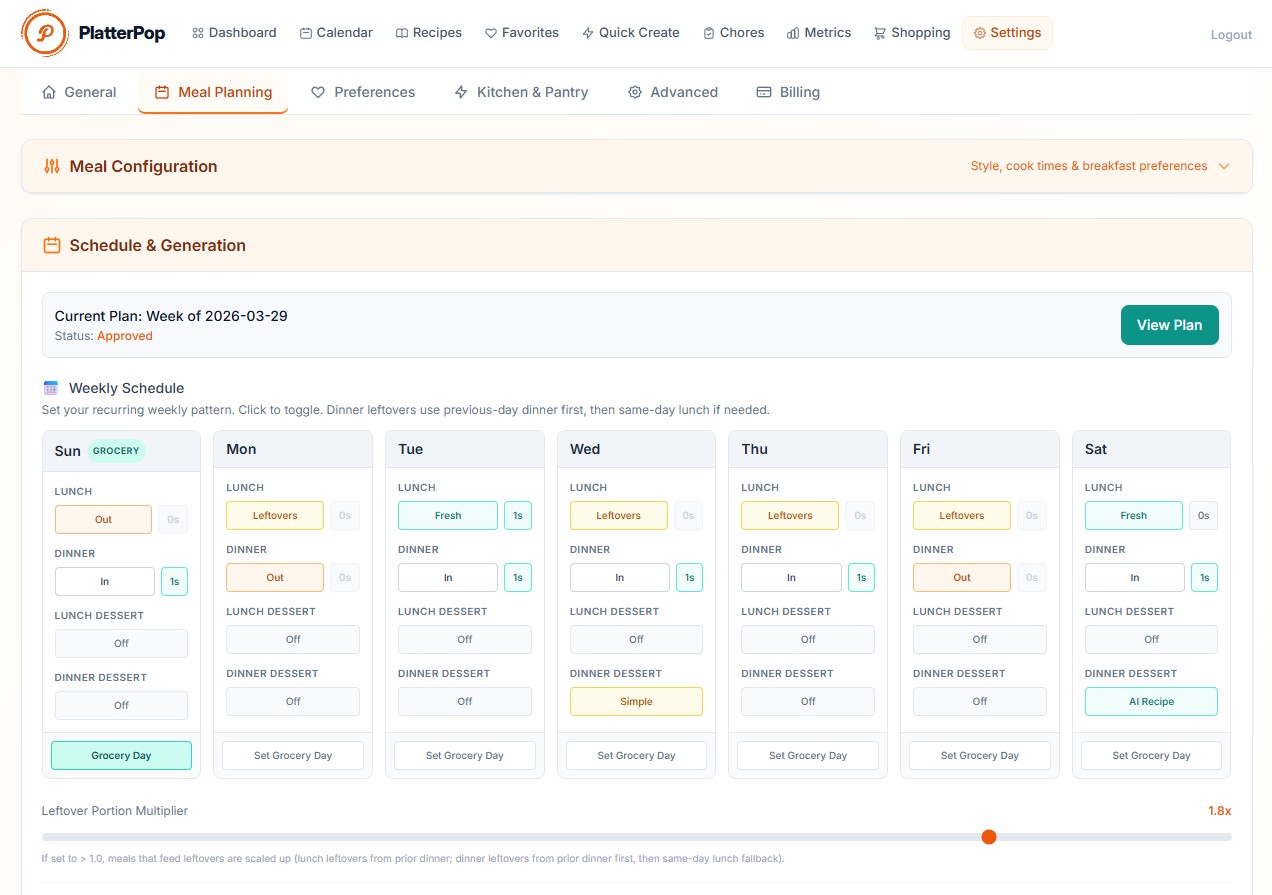
Before generating a menu, you need to tell the app how your week actually flows. In PlatterPop, you set global time constraints for the week. For example, you can tell the AI: "Keep all dinners under 1 hour, lunches under 30 minutes, and desserts to 20 minutes." You can also specify how many side dishes you want per meal.
Next, you tackle food waste and scheduling:
- Fridge Inventory: Input the ingredients currently sitting in your fridge. The AI will prioritize using them up this week.
- Leftovers vs. Fresh: Tell the app if you want to scale up dinners to use as leftovers for lunch, or if you prefer fresh lunch days.
- Grocery Day: Set your designated grocery shopping day. You can choose to generate your menu right away, or have the app wait and generate it perfectly timed for your grocery day.
Step 3: Generate, Review, and Swap
Once your grocery day rolls around (or right away, if you prefer), the AI generates your initial weekly menu. Because it is based on your deep family flavor profile, it usually hits the mark right out of the gate.
However, you always remain in control. As you review the week, you can easily tweak the plan:
- Regenerate: Not feeling a specific dish? Just hit regenerate for that meal to swap it out for something else.
- Smart Swaps: If a recipe calls for pork but you’d rather use chicken, just click the ingredient. You can specify a replacement, and the AI will completely refactor the recipe to match.
- Schedule Adjustments: Got a busy Thursday? Specify an "Eat Out" day, or skip meals entirely if your plans change.
Step 4: Approval and The AI Grocery List Magic
Once your menu looks just right, you hit "Approve." This is where the workflow saves you hours of time.
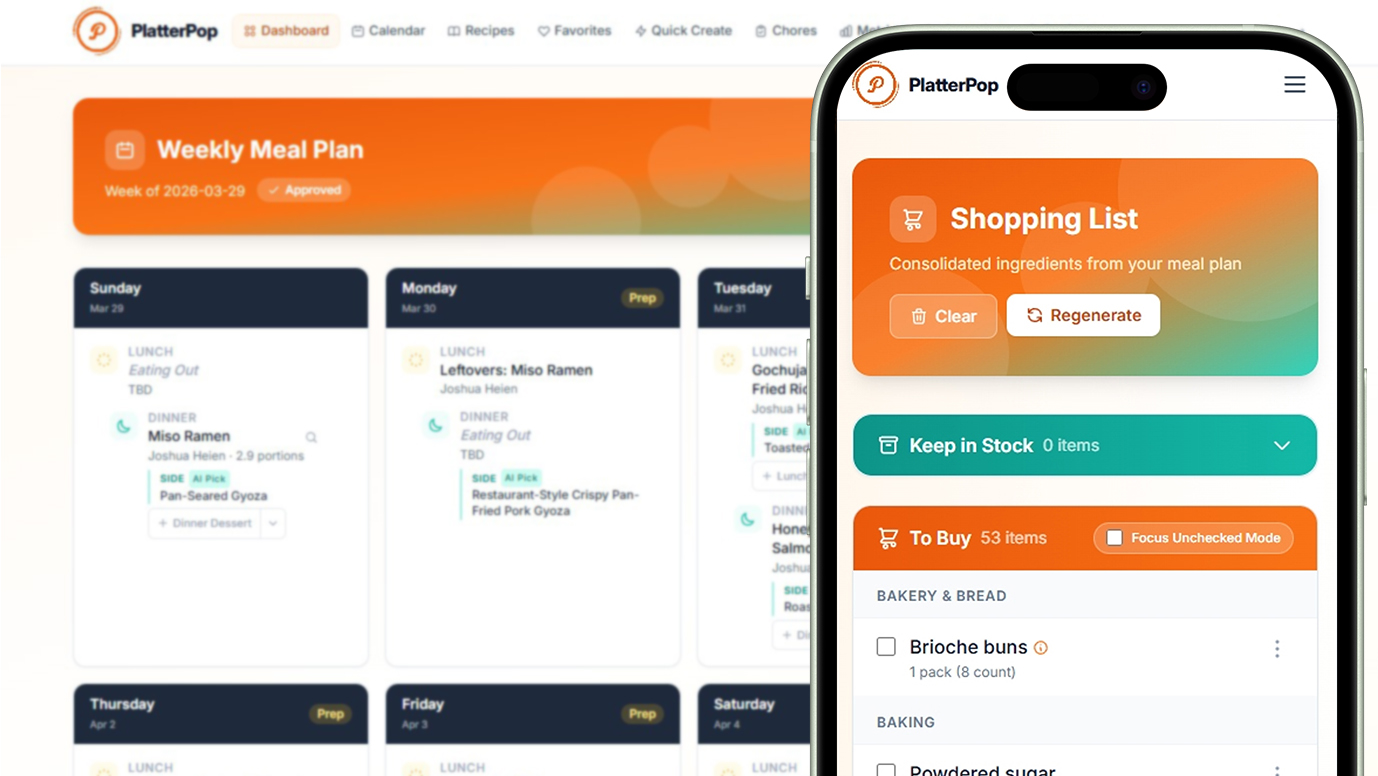
Instantly, the AI gets to work creating the final recipes and generating a master shopping list. Most importantly, it deduplicates the list. If three different recipes call for onions, the app calculates the exact total amount you need and puts "Onions" on the list just once. If you used Smart Swaps in Step 3, the list automatically updates to reflect your changes.
Step 5: Divide and Conquer the Supermarket
You arrive at the grocery store. Usually, this means wandering the aisles, backtracking because you missed the dairy section, and texting your partner to ask what kind of milk to get.
PlatterPop changes the game with a live-syncing shopping list. If you have helpers at the store, you can divide and conquer. Mom can head to the produce section while Dad tackles the dairy aisle. Because you are using the same page on your respective phones, items sync instantly as they are checked off.
You get the grocery shopping knocked out in record time, with zero duplicates, zero forgotten items, and zero stress.
A Smarter Way to Feed Your Family
Going from a blank slate to a fully shopped week of groceries shouldn't require hours of mental energy. By letting an AI learn your family's preferences, manage your leftovers, and build a live-syncing deduplicated grocery list, you remove the friction from mealtime.
Ready to streamline your weekly workflow? Head over to PlatterPop.com to build your family’s profile and generate your first frictionless grocery list today.
Ready to automate this each week?
PlatterPop builds your personalized weekly plan and deduplicated grocery list in minutes.